

Bypass internet censorship easily!
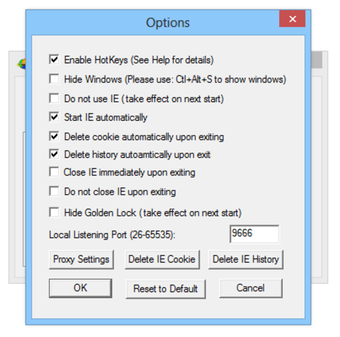
UltraSurf is a popular privacy and security software developed by UltraReach. The anti-censorship software allows you to browse the internet anonymously. While surfing online, your location and identity is always protected. Moreover, the tool automatically deletes your cookies and browser history, ensuring better privacy control. With UltraSurf, you can achieve complete freedom and security. Without leaking your IP Address and location details, you can continue to browse the internet. Most importantly, UltraSurf boosts your connection speed, allowing you to surf faster.
Top Recommended Alternative

Browse the internet anonymously!
UltraSurf functions in a similar way to popular VPN services like NordVPN. However, it’s fundamentally different. This program was developed with the sole purpose of allowing people to bypass geo-blocking measures and strict censorship. With UltraSurf, you can freely browse the web without worrying about blocks or censorship placed by employers, governments, and other institutions. There are several aspects of UltraSurf that make it different from VPN services like Hotspot Shield and HMA! Pro VPN.
Is UltraSurf private and safe?
UltraSurf is a safe service, which can be used to browse the internet anonymously. The program allows only HTTPS traffic through its portal, and blocks less secure HTTP traffic, which gets redirected to your Internet Service Provider (ISP). It’s worth mentioning that HTTPS is a secure and common protocol for browsing the internet. Whenever you visit a website without the additional ‘S’, you’re vulnerable to a wide range of security threats.
Instead of working like a VPN service, UltraSurf acts like a proxy. When you launch the program, a new IP Address is issued to your Windows 10 PC. However, it’s still important to check your existing browser for security flaws.
When it comes to privacy, there’s no need to worry about UltraSurf keeping thorough logs of your data. Though the company keeps minimal logs, they’re only meant for anti-blocking purposes. Your data is kept for only 30 days, and doesn’t get shared with third-party service providers.
Since UltraSurf is based in the United States of America, it has to share information with certain authorities, depending on the law and requirements. Since the tool doesn’t require you to share confidential information upon sign up, you don’t really need to worry about any privacy concerns. The program runs through Internet Explorer, and comes with an additional plug-in for Google Chrome and Mozilla Firefox.
Is UltraSurf easy to use?
While browsers like TOR can be overwhelming to ensure privacy, UltraSurf is easy to use. It comes in the form of an executable file, which doesn’t require a lengthy installation process. Once you exit the program, it doesn’t download additional files on your PC. Moreover, UltraSurf can be stored on an external hard disk or thumb drive to be deployed on the go. This method is perfect for using VPN proxy servers while working on public Wi-Fi.
Unlike most free VPN services, removing UltraSurf from your computer is easy and simple. All you need to do is remove the executable file from your PC. The software launches without any installation from a CD, flash drive, or memory card. It’s worth mentioning that UltraSurf uses the incognito mode as a medium to keep sessions private.
Is UltraSurf fast?
While UltraSurf helps you establish faster connections, the program itself is slow. With the increasing demand, a lot of people report slow upload speed. Fortunately, users haven’t reported too many problems with downloads. Some time ago, the official website of the program crashed due to overload in demand. The company resolved the issue pretty quickly, and apologized publicly to the users.
Unlike Hoxx VPN Proxy and ExpressVPN, UltraSurf isn’t meant for torrenting or streaming. It doesn’t work well with Netflix. It has been reported that Netflix users trying to access servers from the United States experience some issues. It’s important to understand that UltraSurf acts more like a proxy than a VPN service. As such, it can occasionally lose connection due to high demand.
VPN services and proxies route your access requests through different servers. This increases latency and lags. If a program requires more requests, the lag times get higher too. With streaming services, this problem gets worse. Therefore, it’s better to use UltraSurf for browsing the internet, but if you’re interested in streaming or torrenting, you should choose a reputed VPN service.
UltraSurf for bypassing censorship
UltraSurf was designed to help people in China freely access the internet. Over the years, it has evolved to become a fast and free VPN-like service. The program allows you to bypass specific location-based blocks on leading websites like Facebook, Twitter, and YouTube.
In simple terms, UltraSurf was created to provide uninterrupted and unrestricted access to people who’d otherwise be blocked from viewing certain content. It works on the principle that the entire network has been designed for free flow of messages and ideas. With this program, people can claim their right to online access and information.
Ironically, despite boasting a philosophy of anti-censorship campaigns and pro-privacy measures, UltraSurf has put in place some of its own restrictions. However, these are primarily meant to block illicit content. For everything else, it’s a good, free, and easy to use program.
A good choice to ensure online privacy!
With the latest version of UltraSurf, you can easily bypass internet censorship, hide your IP Address from websites, and encrypt online communications. It’s a great tool to protect your privacy, and ensure faster connections online. While using this program, you can access the internet without restrictions or blocks. If you’re looking for a tool to safeguard your privacy while browsing the internet, this one will be an excellent choice.





















.png)



.png)
.png)